How I Built This Portfolio
A deep dive into the architecture, tech stack, and engineering decisions behind this site.
Overview
This portfolio website is built with enterprise-grade technologies to demonstrate full-stack development capabilities, cloud architecture knowledge, and software engineering best practices.
Rather than using a pre-made template, I built this from scratch to showcase my ability to design and implement production-ready applications using industry-standard tools and frameworks.
System Architecture
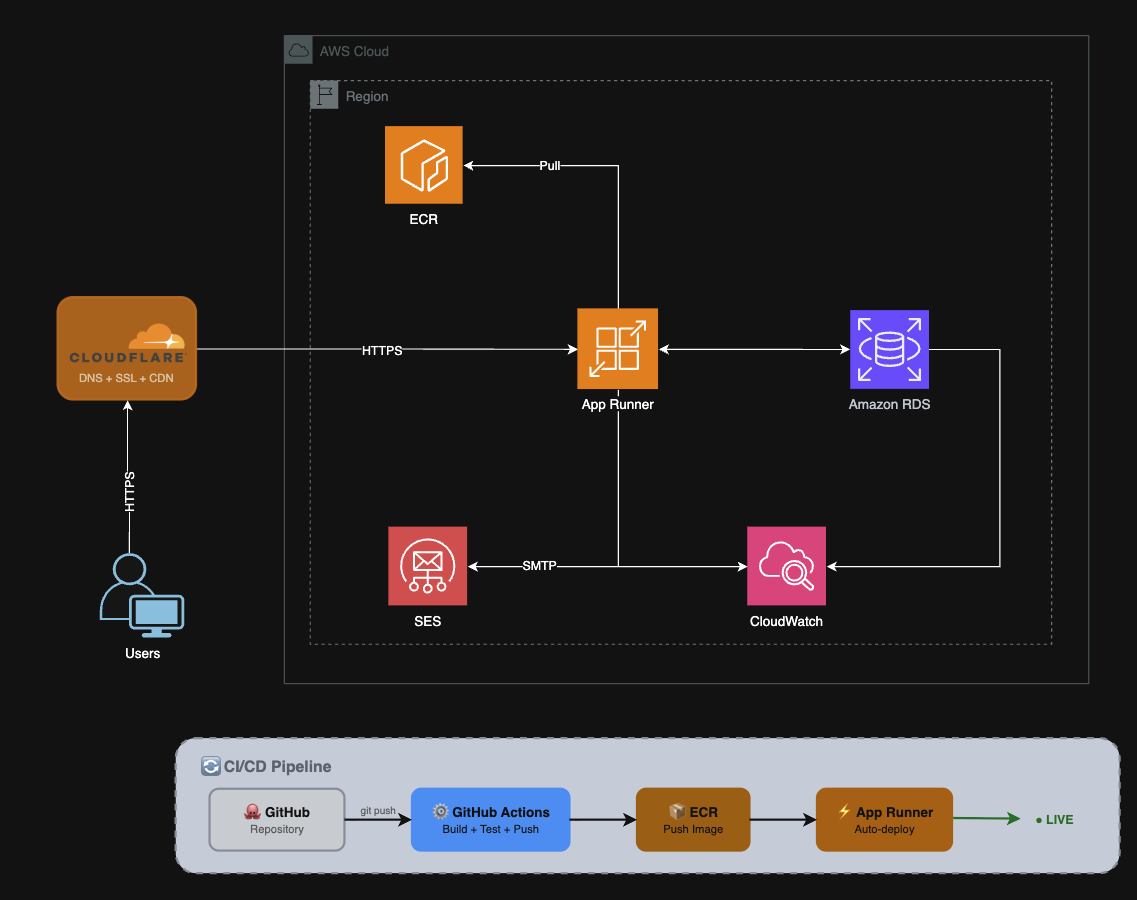
Full-stack architecture deployed on AWS with CI/CD automation
Tech Stack
Backend
- Spring Boot 3.2 - Application framework
- Java 21 - Latest LTS runtime
- Spring Data JPA - Database ORM
- Maven - Build tool
Frontend
- Thymeleaf - Server-side rendering
- Tailwind CSS - Utility-first styling
- Responsive Design - Mobile-first
- SEO Optimized - Server-rendered HTML
Database
- PostgreSQL 16 - Production database
- AWS RDS - Managed hosting
- Flyway - Version-controlled migrations
- H2 - In-memory testing
Cloud Infrastructure
- AWS App Runner - Container hosting
- AWS ECR - Container registry
- AWS SES - Email notifications
- Cloudflare - DNS, SSL, CDN
CI/CD & Quality
- GitHub Actions - Automated pipelines
- Docker - Containerization
- JUnit 5 - Unit & integration tests
- Greptile - AI code review
Monitoring
- CloudWatch - Logs & metrics
- Spring Actuator - Health endpoints
- AWS Budgets - Cost alerts
- JaCoCo - Code coverage
CI/CD Pipeline
Every push to master triggers automated testing, Docker build, and zero-downtime deployment
Key Technical Decisions
Why App Runner over ECS/Fargate?
App Runner provides fully managed container hosting without VPC configuration, load balancers, or auto-scaling setup. For a single-service application, it offers the right balance of simplicity and capability while reducing operational overhead.
Why Thymeleaf over React SPA?
Server-side rendering provides better SEO, faster initial page loads, and a simpler deployment model. For a content-focused portfolio site, an SPA would add unnecessary complexity without significant benefit.
Cost Optimization
The entire infrastructure runs under $25/month by using App Runner's minimal configuration (0.25 vCPU, 512MB), RDS db.t3.micro, Cloudflare's free tier for CDN/SSL, and AWS SES's free tier for email.
View the Source Code
All code is available on GitHub. Explore the implementation details, CI/CD workflows, and infrastructure configuration.
View on GitHub